The Hidden Furnaces of AI Agentic Products
Something that is important to understand when working with agentic products is that we are always in the hands of the product developer.
Of course, the developer has always decided what the product does. But with AI products there is a new layer that I think we need to pay more attention to. The product developer also has a lot of power over how many tokens we spend, not only through the visible features we trigger, but through the hidden furnaces they build into the product.
Hidden furnaces are those features of agentic products that automatically perform some functionality, burning tokens behind the scenes with little or no interaction or insight from the user.
And yes, the huge majority of those tokens will probably be spent by us. We ask the agent to do something big, it runs for a while, calls tools, thinks, retries, reads files, writes code, checks things, and suddenly we have burned a good chunk of our budget. That part is visible. We asked for it.
But that is not the only place where tokens go. I don’t intend this post to be a “scary piece”, because I don’t think this has a lot of impact compared to the huge costs of what we do consciously, but I just want it to be a way to get more insight on what AI harnesses do.
These can be tiny. Small features that feel like normal software, but are actually more model calls, using more inference and costing us more tokens. Not necessarily a lot of them, but still tokens spent without us explicitly asking for them in that moment.
So let’s look at one of the smallest places where this happens.
Conversation titles
Let’s start with the smallest and most common example I can think of. You open a chat product, type your first message, and a moment later the conversation in the sidebar stops being called “New chat” and gets a nice, descriptive title. We’ve all seen it. It feels like a tiny bit of polish, the kind of thing we don’t think twice about.
But that title is not magic, and it is not free. The product didn’t pattern-match your first sentence with some clever bit of string manipulation. Almost certainly, it made another LLM call. Somewhere behind the scenes there is a small prompt that says something like “summarize this conversation into a short title”, your message gets sent off, and a few tokens come back shaped like a name.
So before you have even read the assistant’s first real answer, two inferences have already happened. The one you asked for, and the one you didn’t. The second one is tiny, sure. A short prompt, a short completion, a handful of tokens. But it is still inference. It is still tokens spent so the conversation can have a nice name. You didn’t ask for it, at least consciously.
That is why I like it as the first furnace to inspect. It is so small and so familiar that it is easy to dismiss. And that is exactly why it is worth making visible in our own harness, so we can see the hidden burn happen with our own eyes.
A small UI detour
If a product generates a conversation title, that title needs to live somewhere. In a normal chat app, that is probably the sidebar or the conversation list. In our tiny harness, there is no sidebar. It is just a terminal.
So I changed the harness a bit to support a tiny inline terminal UI. Nothing fancy. Just enough to keep an editable prompt at the bottom and show a status line with things like the model, the current turn, and the current step.
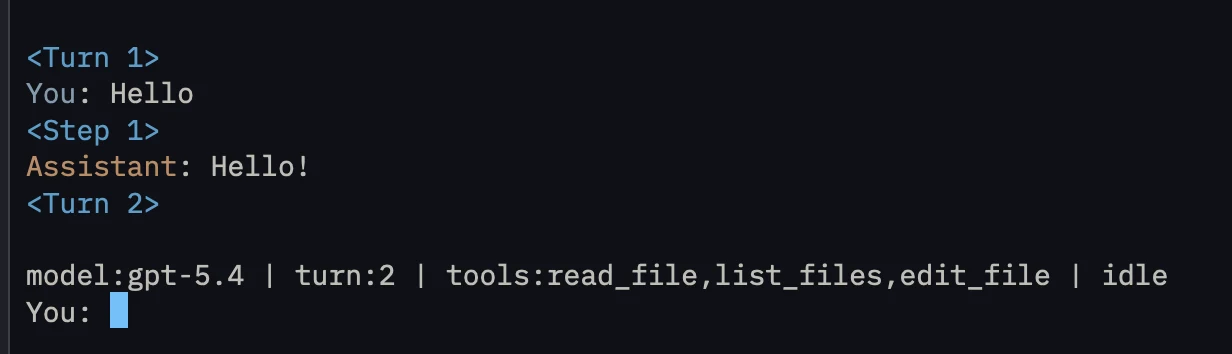
Our harness now talks to a small HarnessUI interface instead of printing and reading directly. The plain implementation still behaves like before. The fancy one switches the terminal into raw mode, reads individual key presses, keeps a tiny input editor, and redraws a two-line footer with the status and the prompt.
The main thing to take into account is that terminal output is not a layout system. Every time the harness prints transcript lines, tool calls, or errors, the footer has to be cleared first and then drawn again after. That is the whole trick. The harness is still the same harness, but now it has an actual place where runtime state can appear.
That is all we need to know for now. This is not a post about terminal UI. The only reason this matters is that the hidden model work needs a visible surface.
Adding title generation to the harness
With that out of the way, we can go back to the actual thing I wanted to inspect. What does it take to add one of these tiny furnaces to our own harness?
The first question was where the title should live. I did not want the model to generate the title as part of the normal assistant answer, because that would hide the point again. The title is not a response to the user. It is product state.
So the harness gets a little bit of state:
var conversationTitle: String?
And the status line we added to the new UI gets a place to show it:
StatusSnapshot(
    model: client.model,
    toolNames: activeToolNames,
    turn: turn,
    step: step,
    conversationTitle: conversationTitle,
    phase: phase
)
This is already an important distinction. The title does not belong to the conversation. It belongs to the harness that is managing the conversation.
Then, after the first user message, the harness starts the hidden burn explicitly:
conversationTitle = "generating..."
But there is an important detail here. The title should not block the real conversation. If the user asked the assistant a question, that answer should start as soon as possible. The title is just a side job.
So the title generation runs concurrently with the normal assistant loop. And here we can reach for the nice structured concurrency solution in Swift, a task group. Every turn runs the assistant task. On the first turn, the harness also adds a title child task. The turn only completes when all the work for that turn is done.
try await withThrowingTaskGroup(of: TurnTaskResult.self) { group in
    if shouldGenerateTitle {
        group.addTask {
            let title = try await Self.generateConversationTitle(from: input, client: client)
            return .title(.success(title))
        }
    }

    group.addTask {
        var taskConversation = conversationForAssistant
        // Run the normal assistant step loop.
        return .assistantFinished(taskConversation)
    }

    while let result = try await group.next() {
        // Apply whichever result finishes first.
    }
}
This is a better fit than a loose unstructured task. The title generation and the assistant loop stay part of the same turn. They are concurrent, but still in lockstep. When the title finishes first, the UI can update immediately. When the assistant finishes first, the harness still waits for the title task before the turn is fully done. And because the task group is always there, adding more side jobs later does not require changing the shape of the loop again.
Swift 6 also forced the code to be honest here. The assistant task cannot capture the mutable conversation variable directly, because that would be shared with the parent task. So the code takes a snapshot for the task and returns the updated conversation when it finishes. Same thing with turn. The background work gets the small pieces it needs, not the whole moving harness.
I also made this a one-shot attempt. If title generation fails, the harness prints the error and moves on. Otherwise this tiny furnace could keep burning tokens due to errors. 🔥
The actual title generation is just an inference call with a specific prompt and an independent conversation that only includes the first user message.
let prompt = """
    Generate a short, plain conversation title for this first user message.

    Rules:
    - Reply with only the title.
    - Use 3 to 8 words.
    - Do not use quotation marks.
    - Do not use punctuation at the end.
    """
let response = try await client.send(messages: [
    Message(role: "system", content: prompt),
    Message(role: "user", content: firstUserMessage),
])
And when it comes back, the harness makes the hidden work visible in the transcript:
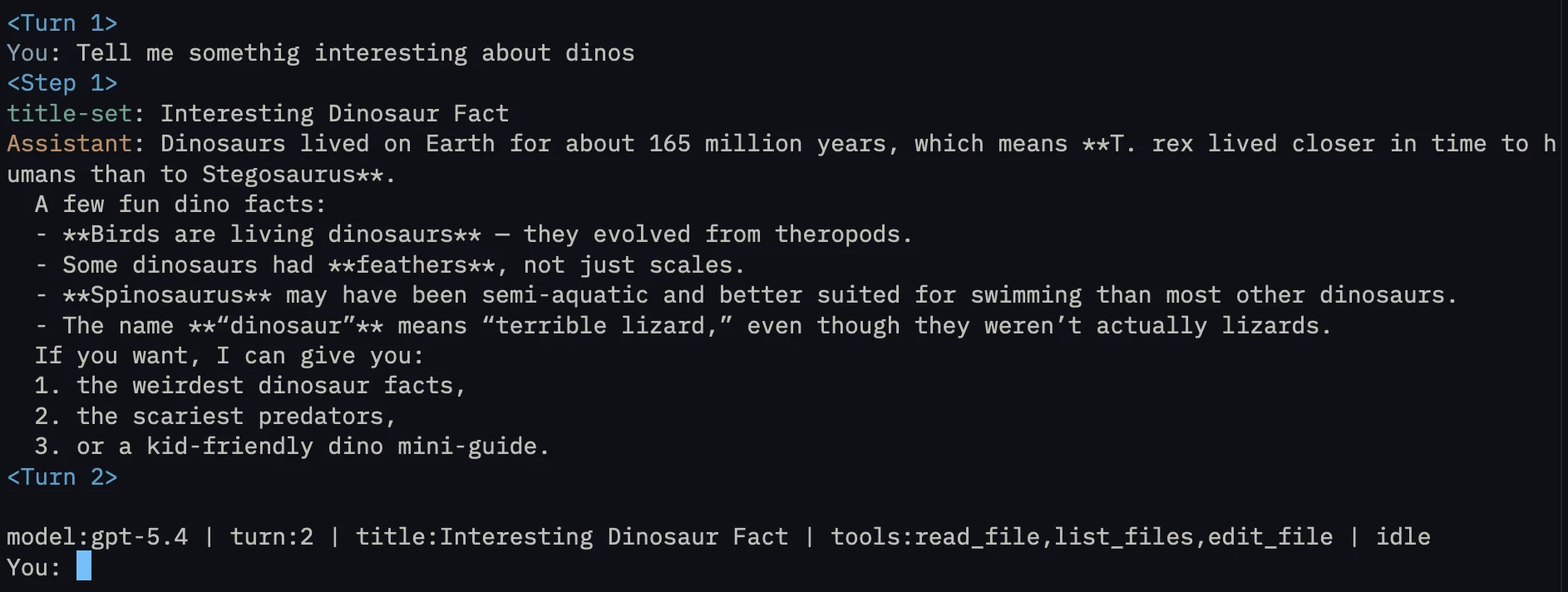
Nothing magical happened. We just made another LLM call while the main conversation kept going. One tiny furnace, now visible.
In fact, it is almost disappointing how simple this is. So let’s customize it a bit more with some extras.
Use the right fuel
Right now, the title generation uses the same model as the main conversation. That model is usually expensive, powerful, and slow for a reason. Maybe the user picked it because they are asking for code changes, or because they want better reasoning, or because they are willing to spend more tokens on the main work. But a title is not that.
This is another place where the harness developer has a lot of power. A good production harness would not usually burn the same fuel for every hidden furnace. It would choose an appropriate model for each background job. Small classification tasks, tiny summaries, conversation titles, routing decisions. Those do not always need the full model that is handling the actual conversation.
For our harness, that means separating the title model from the assistant model. The main conversation can keep using whatever model the user asked for, while the title generator uses something smaller and cheaper.
In this case, I will use gpt-5.4-mini for title generation.
The code change is tiny, but meaningful. The harness now has the normal model, and a separate title model.
@Option(help: "Model name to use.")
var model = "gpt-5.4"

@Option(help: "Model name to use for conversation title generation.")
var titleModel = "gpt-5.4-mini"
At first, when the API clients were created, the title got its own one:
let client = OpenAICompatibleClient(apiKey: apiKey, baseURL: endpoint, model: model)
let titleClient = OpenAICompatibleClient(apiKey: apiKey, baseURL: endpoint, model: titleModel)
Then the title task captured titleClient, not client. That was the entire change in behavior.
Same feature, same generated title, different cost. All from one harness decision the user never sees.
Or no remote fuel at all
With title generation separated from the rest of the conversation, we can have a bit more fun with it.
Why do we need to make an API call to a remote LLM that costs money if we could do the same thing with a local model for free?
This is one of the advantages of working with Swift on Apple platforms. We get access to the Foundation Models framework, which means the harness can ask the local system model for the title instead of sending that tiny background job to a remote API. On supported devices, that model is already there. It is surprisingly powerful, and it is getting better each year.
The nice part is that we do not need to make the title feature know too much about that difference. The right abstraction level, at least for now, is still the same boring API shape we already had:
protocol LLMClient: Sendable {
    func send(messages: [Message]) async throws -> String
}
The OpenAI-compatible client already has that method, so it conforms to it for free. Then the Foundation Models client becomes an adapter. It receives the same chat-shaped messages and turns them into a prompt for LanguageModelSession.
struct FoundationModelsClient: LLMClient {
    func send(messages: [Message]) async throws -> String {
        let model = SystemLanguageModel(useCase: .general)
        let session = LanguageModelSession(model: model)
        let response = try await session.respond(
            to: Self.prompt(from: messages),
            options: GenerationOptions(sampling: .greedy, temperature: 0)
        )
        return response.content
    }
}
So the title code does not become a new special thing. It still builds a tiny conversation with a system prompt and the first user message, then calls send(messages:).
The only thing that changes is which client receives that call, so we can decide before creating the harness.
let titleClient: any LLMClient = switch titleGenerationMode {
case .remote:
    OpenAICompatibleClient(apiKey: apiKey, baseURL: endpoint, model: titleModel)
case .foundation:
    FoundationModelsClient(maximumResponseTokens: 32)
}
The maximumResponseTokens value is just a small cap on the local model output. We only need a title, so there is no reason to let the model keep talking.
That’s it, a simple change, but one that feels very good, as now we’ve added the title functionality to our harness without incurring remote inference cost to our users.
Want the finished project?
The whole point of this post is that you build it yourself, and all the important ideas are already here. But if you want to support my writing, or you just want to save time, I packaged the project for you to download.
Every feature has a cost
It’s obvious conversation titles are not where your token budget goes to die. The real burn is still the obvious stuff, the agent thinking, the tool roundtrips, the long tasks we launch and walk away from. Next to that, a one-shot title call is a rounding error.
But this small title feature illustrates something that is easy to miss. In an AI product, a new feature can carry its own inference cost. That is a real break from the software we are used to. Normally, once you have paid for a product, its features are free to use. A “rename” button costs the developer some engineering and maintenance time, but then costs the user nothing per click. The AI version of that same button can be another model call every time you trigger it, with a meter quietly running behind it.
And that meter is mostly out of your hands. We’ve seen how much the harness developer decides: whether the title uses the big model or a cheap one, whether it calls a remote API or a local model that costs nothing at all. The same small feature can be cheap or expensive depending entirely on choices you never see. They can update your harness overnight and the next day you drain your quota without understanding why.
This is not meant to scare you about titles. It is a small shift in how to look at these tools. It is worth paying attention not only to our own behavior and the big tasks we consciously start, but also to the product itself and the tiny furnaces a developer may have lit on our behalf. And if you are the one building the harness, you now know exactly how easy it is to light one.